一. app.config 文件添加打印机名称设置: 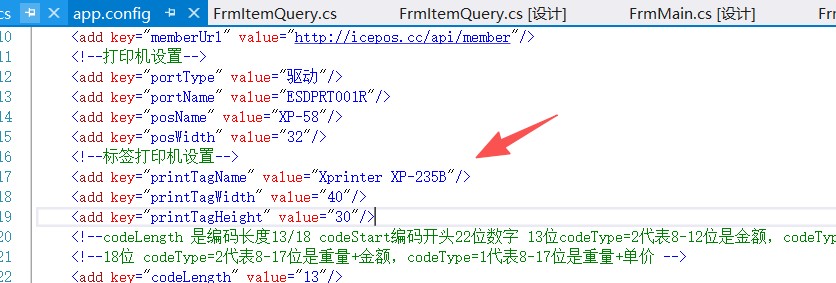
<!--标签打印机设置-->
<add key="printTagName" value="Xprinter XP-235B"/>
<add key="printTagWidth" value="40"/>
<add key="printTagHeight" value="30"/>
二. Gattr.cs 文件 读取配置
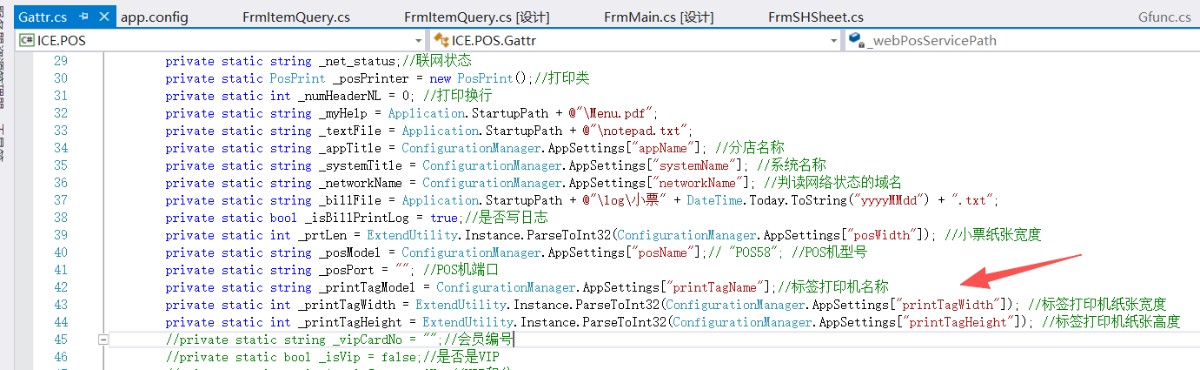
private static string _printTagModel = ConfigurationManager.AppSettings["printTagName"];//标签打印机名称
private static int _printTagWidth = ExtendUtility.Instance.ParseToInt32(ConfigurationManager.AppSettings["printTagWidth"]); //标签打印机纸张宽度
private static int _printTagHeight = ExtendUtility.Instance.ParseToInt32(ConfigurationManager.AppSettings["printTagHeight"]); //标签打印机纸张高度
三. 商品查询窗口添加标签打印按钮控件(自己手动拖一个按钮进去即可)
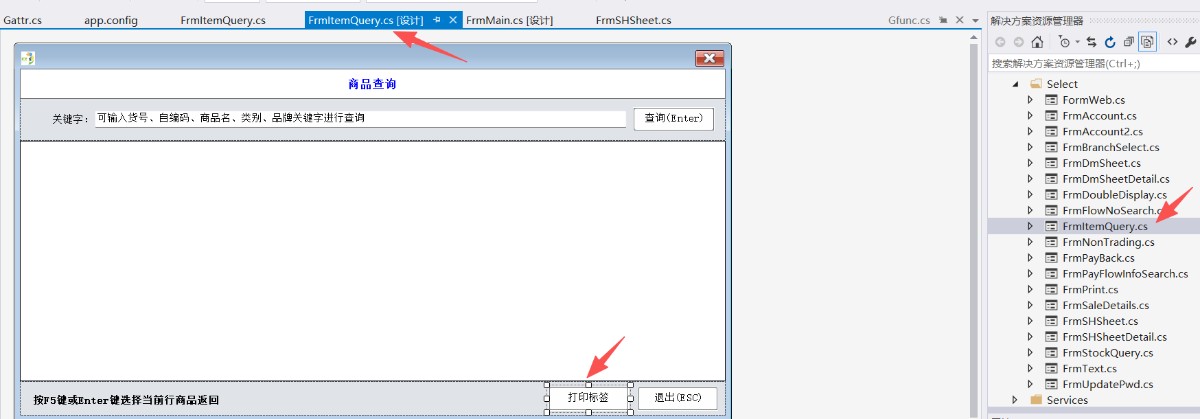
双击"打印标签"按钮即可进入代码编辑: 改默认点击事件名称为下面即可(直接复制):
public void printItemTag(object sender, EventArgs e) {
String item_no = String.Empty;
if ((this.dgItem.SelectedRows.Count > 0) && (this.dgItem.SelectedRows[0] != null))
{
item_no = this.dgItem.SelectedRows[0].Cells["item_no"].Value.ToString().ToUpper();
}
else {
MessageBox.Show("请选择要打印的商品", Gattr.AppTitle);
return;
}
List<t_item_info> saleInfos = Gattr.Bll.GetItemInfoNew(item_no);
if (saleInfos.Count == 0)
{
MessageBox.Show("货号" + item_no + "不存在", Gattr.AppTitle);
return;
}
t_item_info item = new t_item_info();
item = saleInfos[0];
Gfunc.SendToTagPrint(item);
}
四. Gfunc.cs 添加打印标签方法:
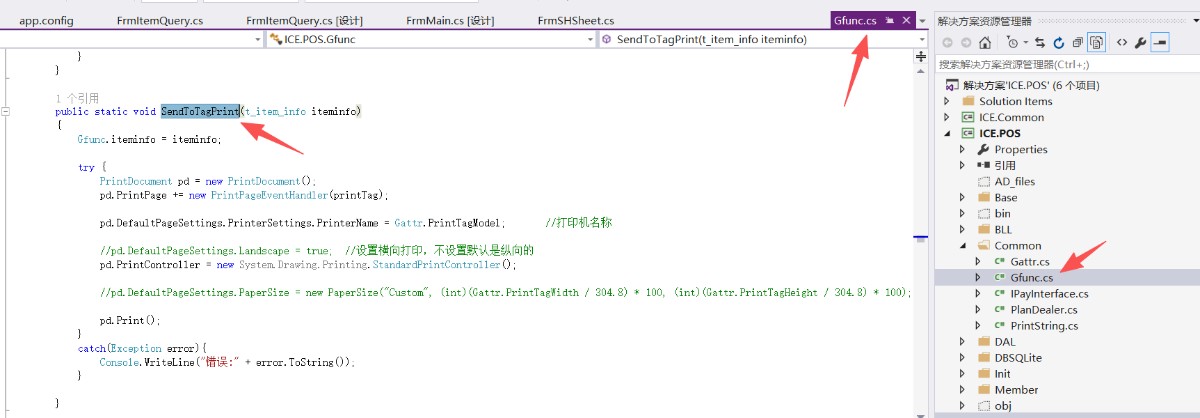
public static void SendToTagPrint(t_item_info iteminfo)
{
Gfunc.iteminfo = iteminfo;
try {
PrintDocument pd = new PrintDocument();
pd.PrintPage += new PrintPageEventHandler(printTag);
pd.DefaultPageSettings.PrinterSettings.PrinterName = Gattr.PrintTagModel; //打印机名称
//pd.DefaultPageSettings.Landscape = true; //设置横向打印,不设置默认是纵向的
pd.PrintController = new System.Drawing.Printing.StandardPrintController();
//pd.DefaultPageSettings.PaperSize = new PaperSize("Custom", (int)(Gattr.PrintTagWidth / 304.8) * 100, (int)(Gattr.PrintTagHeight / 304.8) * 100);
pd.Print();
}
catch(Exception error){
Console.WriteLine("错误:" + error.ToString());
}
}
//标签内容
public static void printTag(object sender, PrintPageEventArgs e) {
Font titleFont = new Font("黑体", 11, System.Drawing.FontStyle.Bold);//标题字体
Font fntTxt = new Font("宋体", 10, System.Drawing.FontStyle.Regular);//正文文字
Font fntTxt1 = new Font("宋体", 8, System.Drawing.FontStyle.Regular);//正文文字
System.Drawing.Brush brush = new SolidBrush(System.Drawing.Color.Black);//画刷
System.Drawing.Pen pen = new System.Drawing.Pen(System.Drawing.Color.Black);//线条颜色
try
{
t_item_info item = Gfunc.iteminfo;
if (item==null||item.item_no==null|| item.item_no=="") {
return;
}
//标题 门店
e.Graphics.DrawString(Gattr.BranchName, titleFont, brush, new System.Drawing.Point(0, 0));
//Point[] points111 = { new Point(20, 28), new Point(230, 28) };
//e.Graphics.DrawLines(pen, points111);
e.Graphics.DrawString("品名:", fntTxt, brush, new System.Drawing.Point(0, 20));
e.Graphics.DrawString(item.item_name, fntTxt, brush, new System.Drawing.Point(30, 20));
e.Graphics.DrawString("产地:", fntTxt, brush, new System.Drawing.Point(0, 35));
e.Graphics.DrawString(item.product_area, fntTxt, brush, new System.Drawing.Point(38, 35));
e.Graphics.DrawString("单位:", fntTxt, brush, new System.Drawing.Point(80, 35));
e.Graphics.DrawString(item.unit_no, fntTxt, brush, new System.Drawing.Point(115, 35));
e.Graphics.DrawString("规格:", fntTxt, brush, new System.Drawing.Point(0, 50));
e.Graphics.DrawString(item.item_size, fntTxt, brush, new System.Drawing.Point(38, 50));
e.Graphics.DrawString("价格:", fntTxt, brush, new System.Drawing.Point(80, 50));
e.Graphics.DrawString(item.sale_price.ToString(), fntTxt, brush, new System.Drawing.Point(115, 50));
Bitmap bitmap = CreateCode(item.item_no);
e.Graphics.DrawImage(bitmap, new System.Drawing.Point(-10, 65));
}
catch (Exception error)
{
//MessageBox.Show(error.Message);
Console.WriteLine(error.Message);
}
}
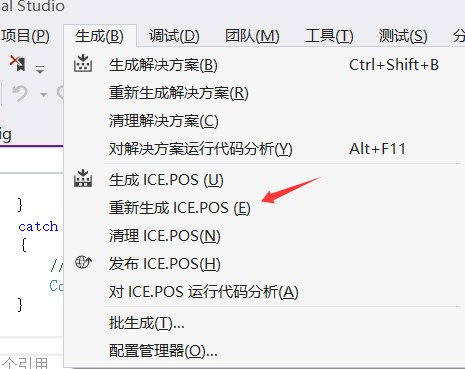
保存所有文件,头顶"生成"->重新生成 ICE.POS 即可!

 分享
分享 BUG
BUG 交流
交流 动态
动态
暂无评论